
Licence waste is easy to talk about and hard to prove. A list of inactive accounts is not enough. IT still needs to know which accounts hold paid licences, what those licences cost, how long each user has been inactive, and whether reclaiming access looks safe or needs review.
We ran GovernSafe against a live connected Microsoft 365 demo tenant. The dashboard found $974 in gross monthly licence savings potential, or $11,688 annualised. The risk-weighted expected figure was lower at $6,584.40 a year.
That difference matters. $11,688 is the full opportunity visible in the data. $6,584.40 is the more conservative planning figure after GovernSafe applies a risk score to each recommendation.
What GovernSafe found
The tenant snapshot contained:
| Measure | Observed result |
|---|---|
| Total users | 29 |
| Licensed users | 24 |
| Unlicensed users | 5 |
| Users in the dashboard's inactive count | 2 |
| Gross monthly savings potential | $974.00 |
| Gross annual savings potential | $11,688.00 |
| Risk-weighted expected annual savings | $6,584.40 |
| Reclaim now recommendations | 10 |
| Review recommendations | 7 |
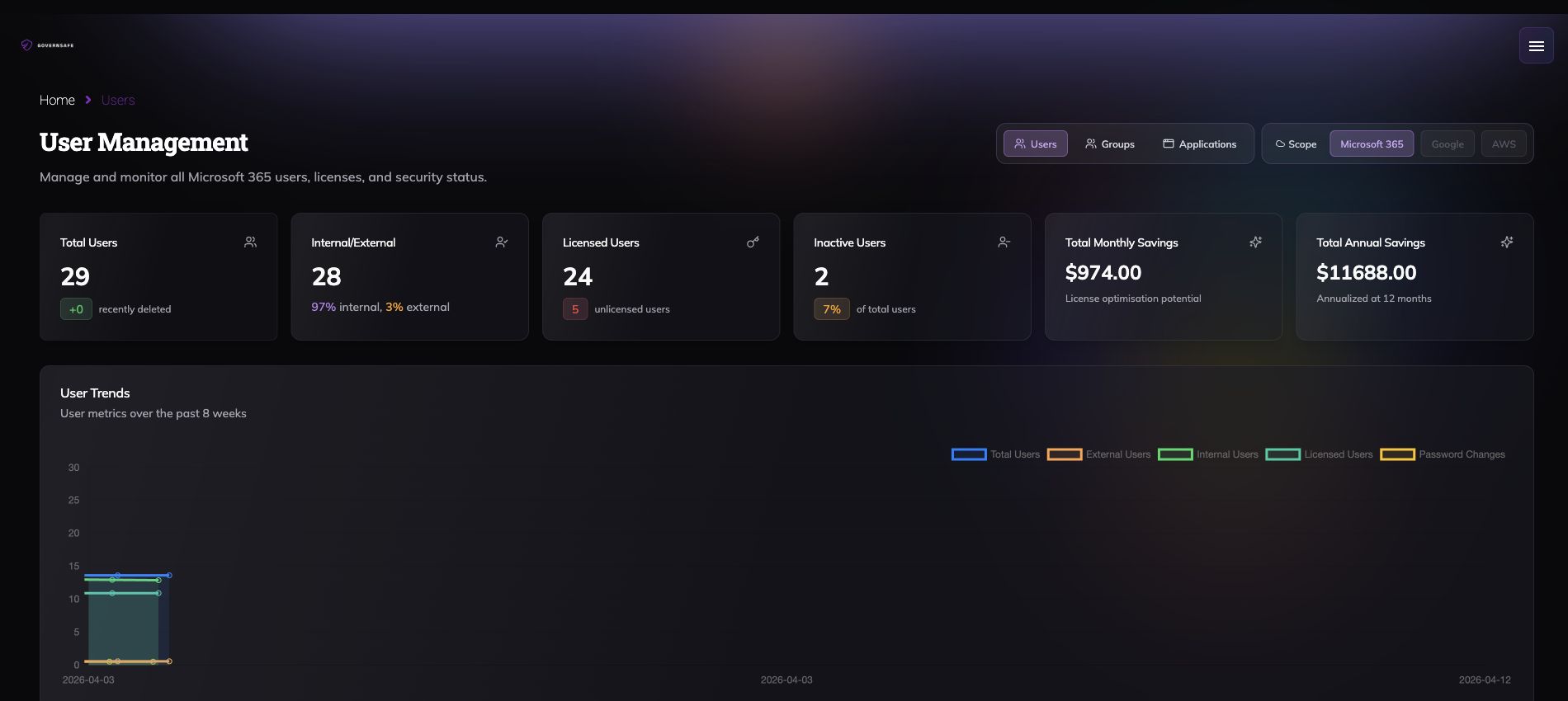
The screenshot stops before the user table. No names, email addresses, or tenant identifiers are included.
The dashboard's inactive count and the optimisation recommendations are separate signals. In this capture, the dashboard showed two inactive users while the savings report placed ten opportunities in "reclaim now" and seven in "review". GovernSafe is not taking one account status and pretending it answers the whole question.
Licence savings beside the rest of the tenant
The main command dashboard puts the savings estimate beside other operational signals from the connected environment. In the same capture, it showed:
- A GovernSafe security score of 78 out of 100.
- 29 total users, with 27 shown as active.
- 10 teams and 28 groups, including 18 security groups.
- 154 DNS-blocked pages over seven days, with 19 in the latest 24 hours.
- An 80% device compliance score across four compliant devices in the endpoint protection panel.
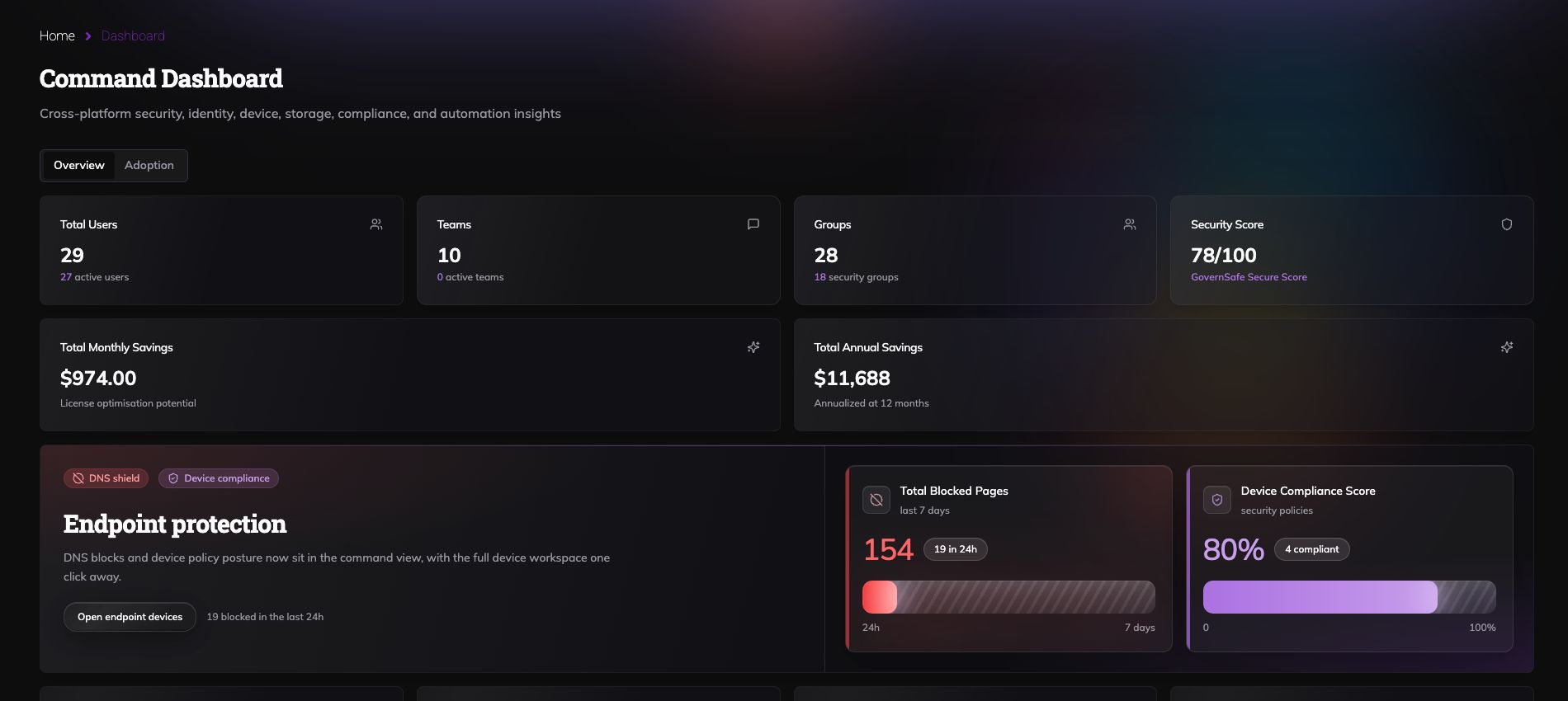
These are observed values from the demo tenant at capture time, not industry benchmarks. Their value is the shared context. Licence waste can be reviewed beside identity, group, endpoint, storage, and security signals without rebuilding an executive view from several exports.
Gross potential is not expected savings
The gross calculation is straightforward:
$974 monthly potential x 12 months = $11,688 annual potential
The detailed report also shows a reclaim risk score for each candidate. In the observed rows, a $480 yearly licence cost with a 0.90 score produced $432 in expected yearly savings. A score of 1.00 kept the full $480.
At report level, the calculation is:
gross savings = sum of candidate licence costs
expected savings = sum of candidate licence cost x reclaim risk score
annual savings = monthly savings x 12
The expected figure is still an estimate. It does not mean GovernSafe has removed a licence or booked the saving. It gives an IT team a better starting point for review.
How the licence optimisation workflow works
GovernSafe connects the recommendation to the account and licence data that an operator needs to inspect. The report brings together:
- The user's assigned Microsoft 365 licences and their modelled cost.
- Days since recorded activity.
- A reclaim risk score.
- A decision tier: reclaim now, review, or monitor.
- Gross and risk-weighted savings for monthly and yearly views.
Operators can search, sort, change the reporting period, and export the detailed opportunity list. The reviewed interface provides recommendations and evidence for a human decision. It does not show an automatic licence removal action.
That is a better fit than a spreadsheet when the job is to move from "we may have waste" to "these are the accounts to review, this is the value at stake, and this is the evidence behind the recommendation."
Why GovernSafe works better for the decision
Native admin reports are useful sources. The work usually gets messy after export: combine user status with activity, map licences to cost, decide what inactivity means, separate obvious reclaim candidates from uncertain cases, and prepare something finance can understand.
GovernSafe keeps that work in one operating view. The headline number stays connected to the user-level recommendations instead of becoming an unsupported savings claim in a slide deck.
The risk-weighted figure also creates a useful brake. Removing every apparently unused licence can disrupt contractors, service accounts, staff on leave, and people whose activity is not fully represented by one signal. "Review" is a real outcome, not a failure to automate.
The second calculator: what separate tools cost
Licence savings answer one question: how much existing Microsoft 365 spend may be reclaimable?
The GovernSafe pricing calculator answers another: what might a stack of separate governance and security products cost compared with one GovernSafe plan?
On 16 August 2026, the live calculator's default 100-user AUD example showed:
| Calculator output | Illustrative amount |
|---|---|
| Selected six-product stack | A$69,625 per year |
| GovernSafe Shield, up to 200 users | A$6,425 per year |
| Indicative cost gap | A$63,200 per year |
| Share of estimated stack spend | 90% |
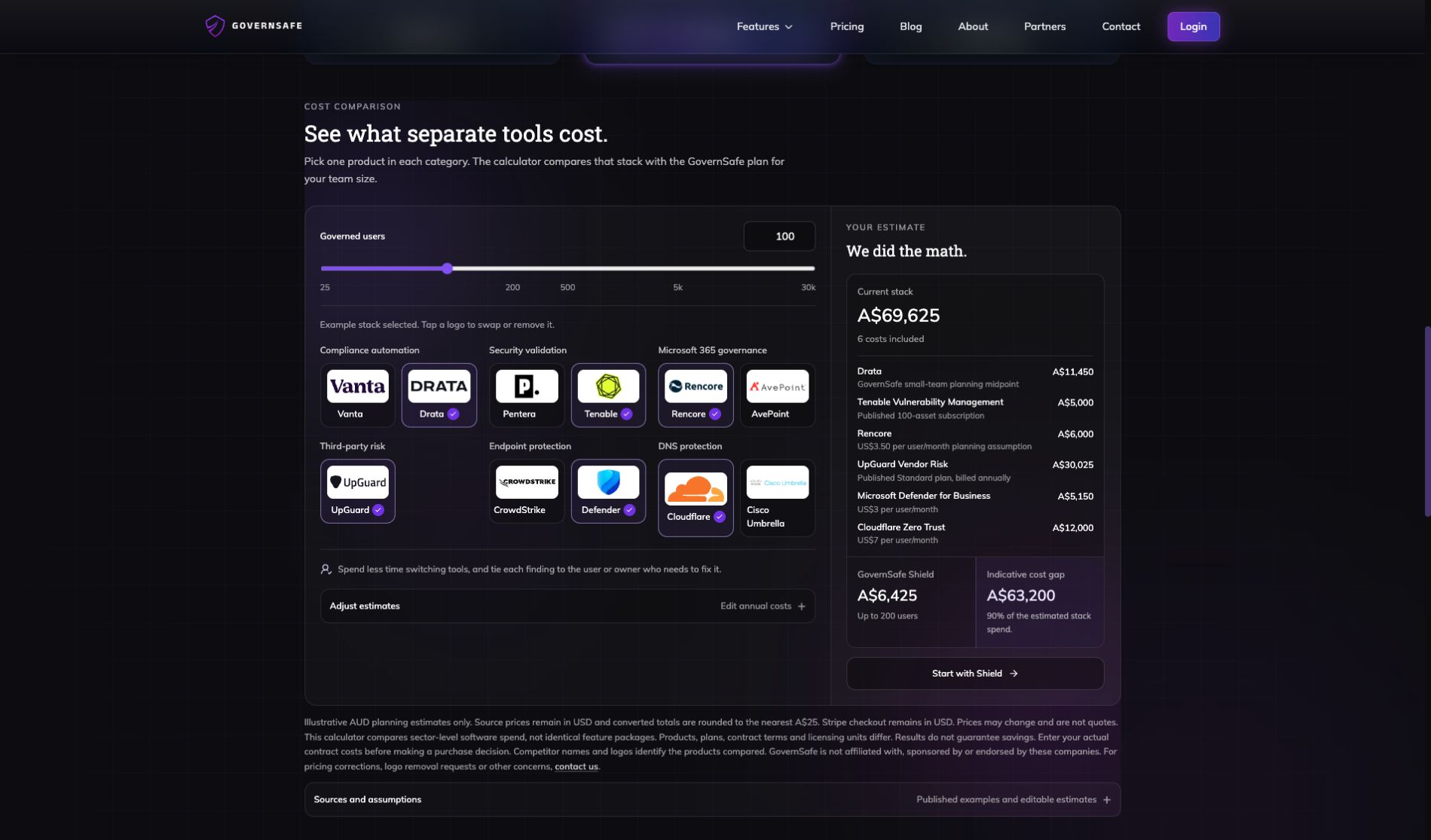
The default stack uses a mix of published examples and clearly labelled planning assumptions. Products, coverage, contract terms, and licensing units differ. The calculator is not claiming that every selected product is identical to GovernSafe, and it does not guarantee a 90% saving.
Use the calculator with your own contract costs. Its logic is transparent:
current annual stack = sum of selected annual product costs
indicative cost gap = current annual stack - applicable GovernSafe annual plan
gap percentage = indicative cost gap / current annual stack x 100
Open the live cost calculator and adjust the inputs.
Do not add the two savings numbers together
The $11,688 tenant opportunity and the A$63,200 stack comparison measure different things.
The first is based on licence assignments and activity inside one connected Microsoft 365 demo tenant. The second compares an editable set of annual software costs with GovernSafe pricing. Adding them would produce a number with no useful meaning.
For a business case, keep the two lanes separate:
- Use the licence report to estimate reclaimable Microsoft 365 spend.
- Use actual vendor contracts in the stack calculator to compare tooling costs.
- Review the operational fit, coverage, and implementation effort before making a purchase decision.
Start with one tenant
A useful licence review should end with named decisions, not a percentage copied from an industry report.
If you are still choosing or rebalancing plan types, start with the Microsoft 365 plans and pricing guide, then use the tenant report to test those assumptions against real assignments and activity.
Connect one Microsoft 365 tenant. Review the gross and risk-weighted savings. Check the reclaim now and review queues. Then put your real vendor costs into the calculator.
That gives finance a number it can trace and gives IT the evidence it needs before changing access.

