
Microsoft 365 plans look simple until a business has to assign them to real people.
One user needs desktop Office apps. Another works in a browser. A security team wants device management and threat protection. Finance wants to know why paid licences remain assigned to inactive accounts. Then Copilot, Teams variants, add-ons and separate governance tools enter the bill.
The visible Microsoft 365 price is only the starting point. The cost that matters is what the organisation pays for, what people use, and how safely IT can reclaim the difference.
This guide covers the current Australian Microsoft 365 business plan prices, how to choose between them, where licence waste appears, and why GovernSafe connects savings decisions with security and compliance evidence.
Microsoft 365 plans and pricing in Australia
Microsoft's Australian pricing page showed the following business plans on 16 August 2026. These prices use annual commitments, are billed per user per month, and exclude GST.
| Microsoft 365 plan | AU price per user/month | Best fit | Important boundary |
|---|---|---|---|
| Business Basic | A$10.50 | Business email, Teams, cloud storage, and web or mobile Office apps | Desktop Office apps are not included |
| Business Standard with Copilot | A$35.20 | Desktop Office apps, business email, Teams, and work-grounded Copilot | Advanced device and threat protection are not the plan's main purpose |
| Business Premium with Copilot | A$47.90 | Desktop apps, Copilot, device management, identity controls, and advanced threat protection | A strong Microsoft security bundle still needs operational review and evidence |
| Microsoft 365 Apps for business | A$15.80 | Desktop Office apps and OneDrive for users who do not need the full collaboration bundle | Microsoft describes it as excluding chat and calling |
Check Microsoft's live Australian business pricing before purchasing. Microsoft also offers variants without Teams, add-ons, promotional pricing and enterprise plans.
For organisations with more than 300 users, Microsoft points buyers to enterprise plans. On the reviewed Australian page, Microsoft 365 E3 was A$56.80 per user per month, E5 was A$85.30, and F3 was A$12.00, each on an annual commitment and excluding GST. Enterprise availability and contract pricing can vary, so check Microsoft's current enterprise page or use your negotiated agreement.
Which Microsoft 365 plan should each user have?
Plan selection should follow the user's job, device, data access and security requirements.
Choose Business Basic when browser access is enough
Business Basic suits users who need business email, Teams, SharePoint, OneDrive and web or mobile Office apps. It can work well for casual staff, frontline users with light document needs, contractors and roles that do not need desktop Office apps.
Do not assign it by department name alone. A contractor who handles sensitive data may need stronger controls than a full-time employee with low-risk access.
Choose Business Standard when desktop apps drive the decision
Business Standard adds desktop versions of Word, Excel, PowerPoint and Outlook. The version presented on Microsoft's reviewed Australian page also included Copilot.
It can suit knowledge workers who need local Office apps but do not need the device, identity and threat-protection bundle in Business Premium.
Choose Business Premium when security and device management justify it
Business Premium adds device security and management, advanced threat protection, and sensitive-data capabilities. It can make sense for administrators, executives, finance teams, people handling regulated data, and managed devices that need stronger policy enforcement.
Premium is expensive when assigned as a default and barely used. It is cheap when its security capabilities prevent the need for another control or close a real risk. Usage and risk have to be reviewed together.
Use enterprise plans when scale or control depth requires them
Microsoft positions enterprise plans for organisations above the 300-user business-plan limit and for buyers needing deeper security, compliance, analytics and administration.
E3, E5 and frontline plans are not a simple good-better-best ladder. Organisations often mix licences by role. That creates savings opportunities, but it also makes ownership and evidence more important.
Microsoft 365 price is not the same as Microsoft 365 cost
A plan price answers one question:
base licence cost = assigned seats x monthly price x 12
The annual operating cost is wider:
Microsoft 365 cost = base licences
  + Copilot, Teams, voice, security and compliance add-ons
  + unused or oversized licences
  + separate governance and security products
  + staff time spent reconciling reports and decisions
This is why a cheaper licence can still be a poor decision, and why a more expensive licence can be justified. The plan has to match the user and the control requirement.
Where Microsoft 365 licence waste appears
Licence waste is rarely one clean list. Common patterns include:
- Licences still assigned to inactive or departed users.
- Premium plans assigned to people who use only basic services.
- Duplicate capabilities across Microsoft plans and third-party products.
- Add-ons left behind after a project, trial or role change.
- Accounts that look inactive but still support a service or business process.
- Users whose work moved to another platform while their Microsoft entitlement remained.
The first four patterns may look like easy savings. The last two are where a blunt script can break something important.
A live tenant showed $11,688 in annual licence savings potential
GovernSafe reviewed a live connected Microsoft 365 demo tenant with 29 users, including 24 licensed users. The licence optimisation dashboard showed:
| Measure | Observed result |
|---|---|
| Gross monthly savings potential | $974.00 |
| Gross annual savings potential | $11,688.00 |
| Risk-weighted expected annual savings | $6,584.40 |
| Reclaim now recommendations | 10 |
| Review recommendations | 7 |
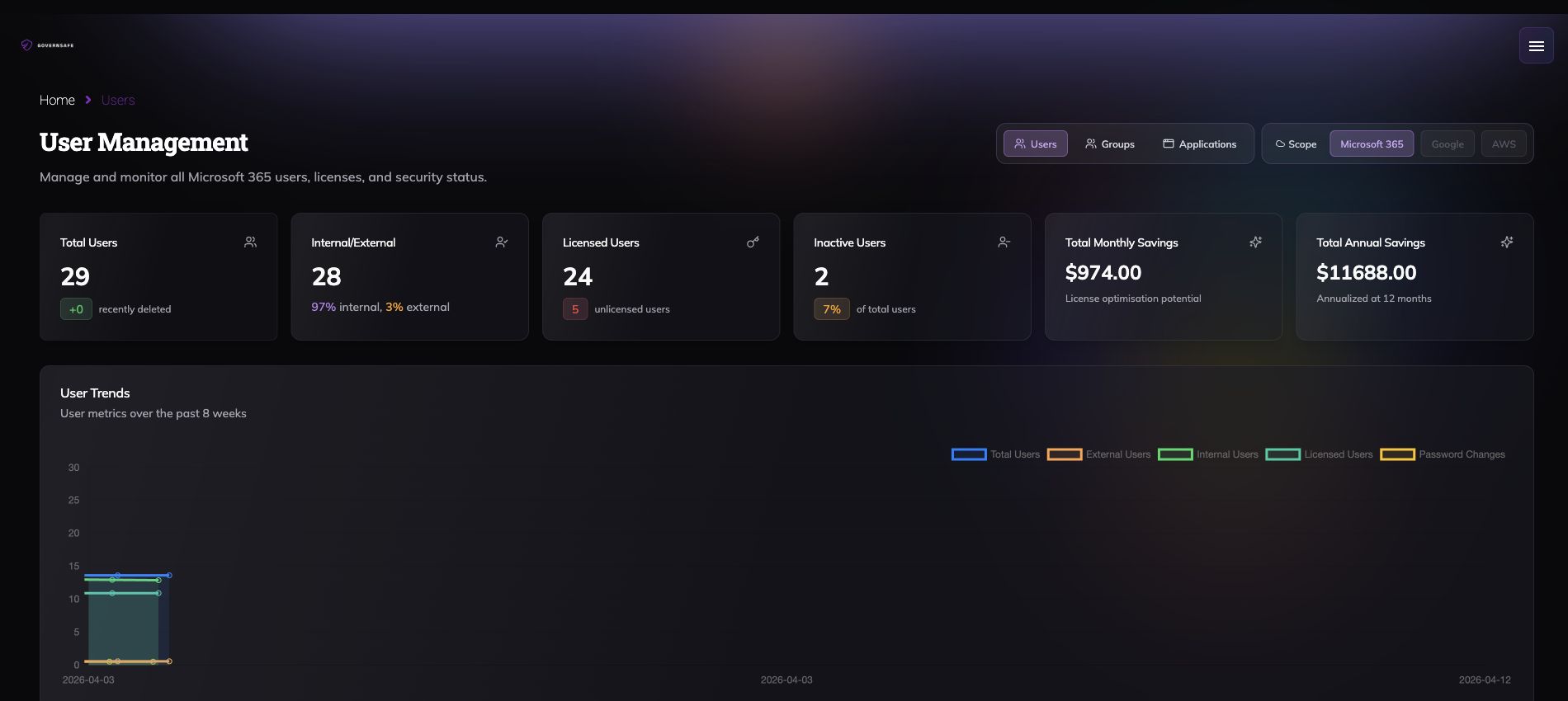
The gross figure is the full modelled opportunity. The expected figure is lower because GovernSafe applies a reclaim risk score to each recommendation.
No licence had to be removed to produce the report. The figures are opportunities from a demo tenant, not booked customer savings.
See the full live-tenant licence optimisation walkthrough.
Why licence optimisation needs security context
An unused seat is a cost signal. It is not enough evidence for an access decision.
The same tenant may contain privileged accounts, service dependencies, risky devices, weak email authentication, exposed domains, unresolved compliance work, or active security findings. Those signals can change the order in which IT acts.
The GovernSafe command dashboard places licence savings beside tenant security, users, teams, groups, DNS protection and endpoint compliance.
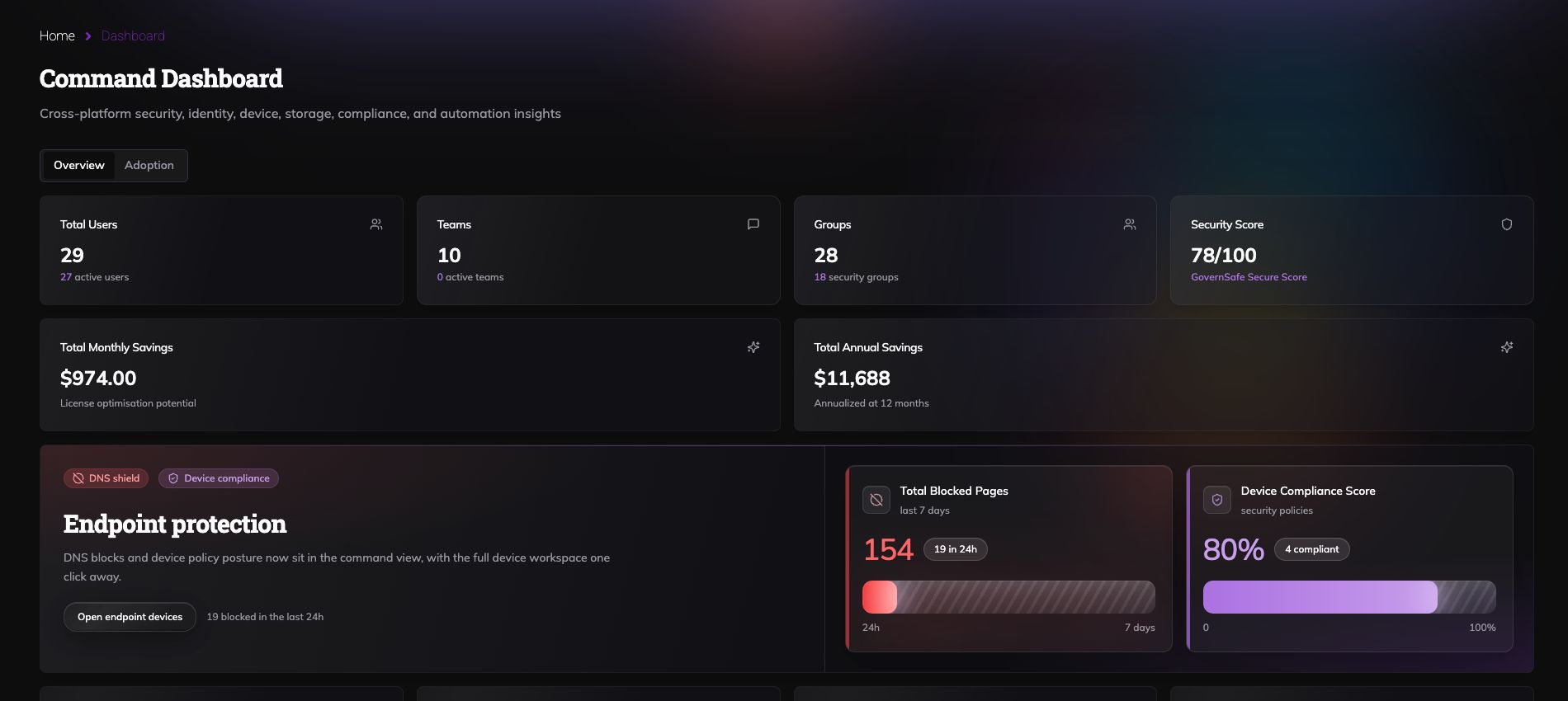
In the observed demo capture, the dashboard showed a GovernSafe security score of 78 out of 100, 154 DNS-blocked pages over seven days, and an 80% device compliance score across four compliant devices. These are point-in-time demo values, not industry benchmarks.
The value is the shared context. Finance can see the savings opportunity. IT can see the surrounding risk before making a change.
Nine operating functions should not become nine silos
GovernSafe connects nine functions that commonly end up split across admin portals and vendor tools:
- Microsoft 365 licence optimisation.
- Microsoft 365 user, group and tenant governance.
- Compliance evidence and control monitoring.
- Endpoint protection posture from macOS and Windows agents.
- DNS protection and blocking telemetry.
- Domain security and external footprint monitoring.
- Email authentication posture across SPF, DKIM and DMARC.
- Third-party risk review and evidence.
- Agentic penetration testing with evidence and retest status.
Microsoft provides important native controls through Entra ID, Intune, Defender, Purview and the Microsoft 365 admin portals. GovernSafe does not pretend those products disappear. It brings their operational signals together with other cloud, endpoint, domain, compliance and validation evidence.
See how those signals connect in the Microsoft 365 governance platform. If you need the operating model first, use the Microsoft 365 governance guide.
A longer feature catalogue is not a working operating model. GovernSafe turns those signals into one decision queue, with the evidence and ownership intact.
What Rencore and AvePoint sell, and where GovernSafe goes further
Rencore and AvePoint both sell Microsoft 365 governance capabilities. GovernSafe takes on the wider operating problem: licence cost, control evidence, endpoint posture, DNS, domains, email authentication, third-party risk and penetration-testing evidence in one platform.
| Platform | Public strength | Boundary visible in official material |
|---|---|---|
| Rencore Governance | Microsoft 365, Power Platform, Copilot and agent governance, with policy automation, compliance and cost control | Rencore's Microsoft Defender article says it is primarily a governance solution rather than a threat-security tool |
| AvePoint Confidence Platform | Data governance, Microsoft 365 administration, backup, migration, compliance and licence optimisation | AvePoint's Control Suite lists products such as Cloud Governance, EnPower, Cense, Insights and MyHub; License Optimization and Compliance Guardian have their own product scopes |
| GovernSafe | Cost, governance, endpoint, DNS, domain, email, compliance, vendor risk and active security validation | Broad coverage requires prioritisation, so disruptive access changes remain reviewable rather than being hidden behind an automation claim |
Rencore's own AvePoint alternative page criticises AvePoint for multiple modules and separate interfaces. The same page describes Rencore as focused solely on governance, without backup or archiving.
AvePoint's platform may connect its named products through shared architecture. GovernSafe makes the commercial choice simpler: one operating platform instead of another collection of product scopes to reconcile.
The comparison is not "they have no governance" or "they have no compliance." They do. The buying question is what still sits outside that scope. If the answer includes endpoint posture, DNS, external domains, email authentication, third-party risk and penetration testing, the cheaper-looking governance tool can leave an expensive stack behind it.
How GovernSafe's proprietary licence engine works
GovernSafe combines assigned licences, modelled cost, activity context and a reclaim risk score. It separates opportunities into three review tiers:
| Tier | Operator action |
|---|---|
| Reclaim now | The evidence supports immediate human review for removal |
| Review | More ownership or business context is needed |
| Monitor | Keep watching instead of forcing a saving |
The internal weighting is proprietary. The operator-facing evidence remains visible: the account, assigned licences, modelled cost, inactivity context, risk score and recommendation tier.
This is where agentic claims need discipline. GovernSafe uses bounded agents and automation to collect evidence, rank pressure, run security workflows and prepare actions. A licence recommendation is not presented as a completed removal.
Putting an AI badge on nine dashboards would be theatre. GovernSafe does the useful work: connect the evidence, route the next action and preserve why the decision was made.
Compare the wider software stack separately
Microsoft 365 licence savings and third-party software consolidation are different business cases. Do not add the two numbers together.
GovernSafe's stack-cost calculator lets you choose products across compliance automation, security validation, Microsoft 365 governance, third-party risk, endpoint protection and DNS protection. Published examples and planning assumptions are labelled separately, and the assumptions can be replaced with your real contract costs.
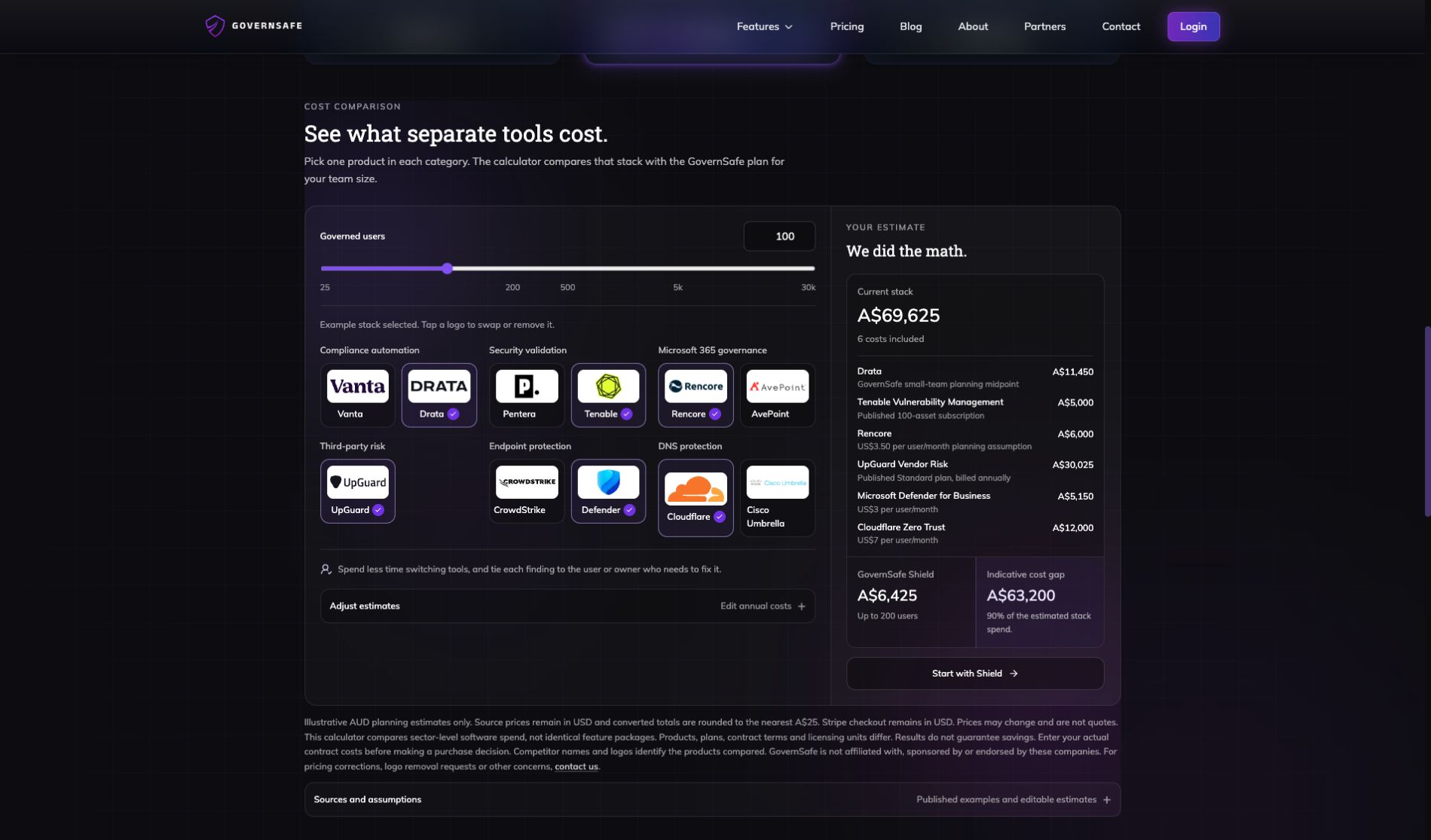
The output is an indicative planning comparison, not a quote, a feature-equivalence guarantee, or a promised saving.
Open the calculator and enter your real vendor costs.
How to reduce Microsoft 365 cost without breaking access
Use this order:
- Export or connect current user, licence and activity data.
- Map each plan to the user's role, devices, apps and security requirements.
- Separate inactive, oversized and uncertain assignments.
- Review privileged, service and exception accounts with an owner.
- Reclaim or downgrade approved licences.
- Track the decision and repeat the review on a schedule.
- Compare separate governance and security products using actual contract costs.
The arithmetic is simple. The evidence and ownership are what make the saving defensible.
Microsoft 365 plans should match real work
The best Microsoft 365 plan is not the cheapest plan or the plan with the longest feature list. It is the least expensive plan that supports the person's work and the organisation's control requirements.
Start with current pricing. Then inspect assignments, activity and risk in the live tenant. GovernSafe turns that evidence into gross savings, risk-weighted expected savings and a review queue, while keeping the surrounding endpoint, DNS, domain, email and compliance context visible.
That is how Microsoft 365 pricing becomes a cost decision an IT team can defend.

